Introduction
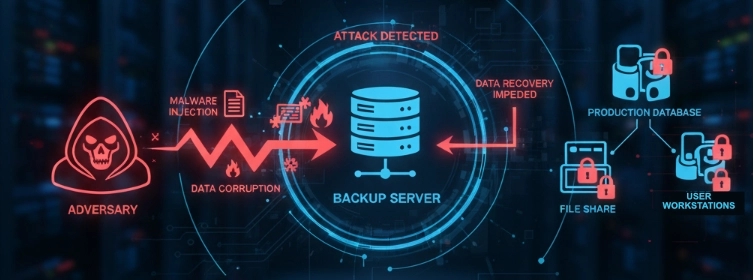
When ransomware or a destructive cyberattack hits, organizations rush to restore from backups. But what if your backups are already compromised? In many real-world attacks, adversaries aim to poison or disable fallback systems, leaving victims with no clean recovery option. To truly have resilience, your backup systems must be designed, maintained, and tested so they remain trustworthy, even when your primary environment is breached.
In this article, we’ll explore how backups get compromised, the core principles for keeping them clean, practical strategies to implement those principles, and a step-by-step restore playbook you can follow in crisis situations.

How Backups Become Compromised
Backups are no longer passive archives, they are active targets. Threat actors that successfully reach your systems often aim for backups first, because they know that controlling backups gives them control over your ability to recover.
Silent Capture of Malware
- Backup jobs typically copy what exists in production systems. If malware has infiltrated the environment quietly, backup cycles can store that same malware. What you think is a clean snapshot may already be a vessel for reinfection.
Credential Compromise & Abuse
- Backup systems often require privileged access. If an attacker compromises these credentials, they can manipulate or delete snapshots, alter retention policies, or even encrypt backup data. The damage might only be discovered during recovery.
Lateral Movement into Backup Infrastructure
- Backup systems often share network paths or management connections with production systems. Once an adversary gains a foothold, they may pivot into backup servers, disable agents, plant malicious files, or remove historical data.
Ransomware that Targets Backups
- Modern ransomware groups don't just encrypt endpoint files, they actively hunt backups and delete or encrypt them, including shadow copies and cloud-stored backups. In one survey, 20% of ransomware attacks involved attackers deleting backups or disabling shadow copies. (Barracuda Ransomware Insights Report 2025)
More Based on Research of Advanced Threats
- Recent research into ransomware techniques shows double extortion, fileless attacks, and stealthy seed planting are common. These methods make it harder to detect infection until it’s too late. (Evaluating Modern Ransomware and Effective Data Backup and Recovery Solutions, 2024)
- Because backups themselves can be attacked, your recovery plan must assume that any point-in-time copy could have been contaminated, unless you take steps to defend it.

Principles for Clean Backups
To guard against contamination, your backup strategy should be built on strong principles. Here’s what to embed in your design:
Isolation & Immutability
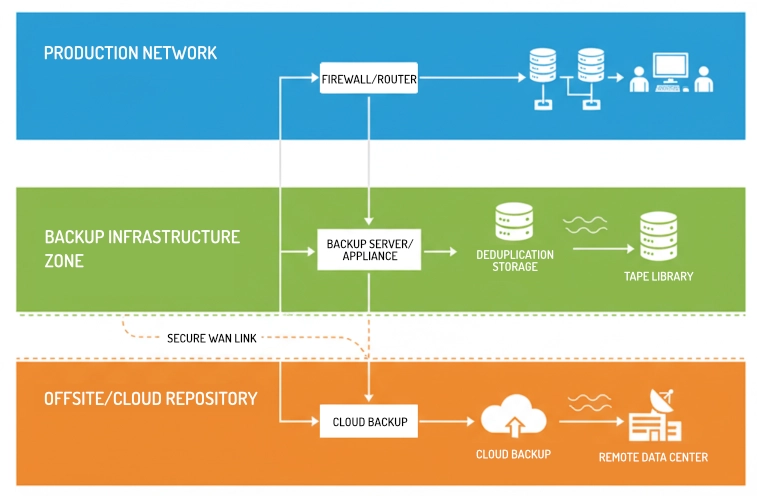
- Backups should reside where attackers can’t reach them. Use physical air-gaps (e.g., tape units disconnected from networks) or storage with immutability guarantees such as WORM (Write Once, Read Many - data storage that prevents editing, deletion, or hiding of data after input) or object-lock in cloud systems.
Minimal & Isolated Access
- Backup platforms should use least privilege, enforce multi-factor authentication, and restrict access to dedicated, hardened systems.
- Administrative accounts for backups should be separate from daily-use accounts and tightly controlled.
Multi-Version Retention
- Maintain a layered retention structure: short-term daily copies, weekly snapshots, and long-term monthly/annual archives. That way if recent backups are invalid, an older clean copy may still exist.
Integrity Validation & Malware Scanning
- Automate integrity checks, checksums, and hash verifications for every backup job.
- Before restoration, scan backups in a sandbox or isolated environment to detect hidden malware.
Monitoring & Alerting
- Integrate backup logs, job results, and storage events into your SIEM or monitoring platform.
- Raise alerts for unusual events, mass deletions, retention changes, or repeated job failures.
Regular Recovery Testing
- A backup that’s never restored is worthless. Schedule periodic drills to restore backups in isolated systems, validate application integrity, and test your recovery methodology end to end. These principles don’t just reduce risk, they shift backups from passive storage to active, hardened recovery assets.

Practical Strategies and Technical Controls
Principles are a compass; strategies are the map. Here’s how to harden your backups in practice:
Segmentation of Backup Infrastructure
- Place backup servers and storage on separate network segments, VLANs, or physically isolated zones.
- Limit direct access from production systems.
Encryption End-to-End
- Encrypt data both in transit and at rest. Use strong protocols like TLS and AES-256. Even if backups are accessed, encryption helps prevent unauthorized reading.
Immutable Storage Features
- Use cloud services supporting immutability (e.g., S3 Object Lock, Azure immutable blobs) or hardware-backed WORM media to prevent data modifications or deletions.
Automated Health Checks & Repair
- Implement automated checks for job completeness, file-level checksums, and backup integrity. Some systems will even auto-repair detected corruption. (OpenText’s “Backup and Recovery Considerations” white paper discusses designing with recovery and verification in mind.) (OpenText White Paper)
Controlled Restore Pipelines
- Never move backup data directly to production. First restore it in an isolated environment, scan it, validate it, and only then promote it.
Robust Logging, Auditing & Role Separation
- Every administrative action: delete, change, override, should be logged, time-stamped, and tied to an accountable user. Role separation ensures no one actor can both write and erase backups.
Zero Trust for Backup Access
- Apply zero-trust principles: verify and authenticate every request, limit exposure, and dynamically grant least privilege. Treat every access to backup systems as high risk.
These strategies, when layered together, create defenses that make backup systems resilient to compromise, even in aggressive adversary scenarios.

Incident Response Playbook for Restore
Having hardened, clean backups is vital but knowing how to restore them without mistake is just as critical. Below is a structured playbook your team can follow during an incident:
- Step 1: Incident Triage & Scoping
- Conduct forensic triage to identify attack vectors, affected systems, and possible timeframes of intrusion. Document systems that may be compromised before restoring anything.
- Step 2: Contain the Threat
- Isolate infected systems, disable compromised accounts, block network access from suspicious nodes. This ensures the attacker can’t continue tampering while you restore.
- Step 3: Verify Backup Integrity
- Before restoring, run integrity checks, hash verifications, and malware scans on backups. If possible, cross-compare with logs or external references to confirm consistency.
- Step 4: Restore to an Isolated Environment
- Bring up the backup in a staging or sandbox system not production. Run application tests, sanity checks, and further malware scanning before promotion.
- Step 5: Harden Restored Systems
- Before reconnecting, apply latest patches, security configurations, disable unnecessary services, and confirm baseline audit and endpoint security tools.
- Step 6: Gradual Promotion & Monitoring
- Roll out services gradually, start with lower-risk systems or components and monitor logs, network traffic, and user behavior aggressively. Any anomalies must be halted immediately.
- Step 7: Document Lessons & Improve
- After successful recovery, perform a full after-action review. Record timing, decisions, failures, and process improvements. Update your playbooks, policies, and backup strategy accordingly.

Real-World Backup Restoration Use Cases
To bring all these principles together, let’s look at real-world examples of how different systems, from Active Directory to cloud workloads can be backed up, validated, and restored cleanly. These use cases show how to design and execute trustworthy recovery in practice.
Use Case #1: Clean Backup for a Windows Domain Controller
Active Directory is the backbone of most enterprise networks. If an attacker compromises it, they can control authentication, create hidden admin accounts, and persist across the environment. Restoring a clean AD is critical to re-establish trust within your network.
Process:
- Build a golden image. Start by maintaining a hardened, clean AD domain controller image. This image should include:
- A fully patched OS version
- Baseline GPOs aligned with CIS benchmarks
- Preconfigured audit and monitoring policies
- No third party or non essential software
- Perform regular system state backups. You can use Windows server backup to capture full system state data.
- Store backups in immutable or air gapped repositories. Send at least one copy of your AD Systems State backups to immutable storage such as Azure Immutable Blob Storage, AWS S3 Object Lock or offline encrypted tape.
- Ensure backups are encrypted at rest using AES-256.
- Restrict write/delete access to dedicated service accounts protected by MFA.
- Use versioning to maintain older recovery points in case of delayed detection of compromise.
- Validate and test in isolation. Each month or after any major system change, restore one backup copy to a sandboxed VM in an isolated network and do the following:
- Boot the restored DC and verify AD consistency using dcdiag and repadmin /replsummary
- Run a full malware scan.
- Compare hashes of system binaries and registry hives against your golden image. This validation will check if your backup data hasn’t silently inherited malware or persistence mechanisms.
Use Case #2: Web Application and Database Backup
Web servers and databases are often targeted together. Ransomware encrypts the database, while attackers deface or inject malicious scripts into web code. Restoring both cleanly is essential to resume operations safely.
A reliable approach is to use application-aware backup platforms like Veeam Backup & Replication which can capture both your web server files and database snapshots in a consistent, verified state. Veeam integrates directly with services like IIS and SQL Server. It also supports immutable storage and automated restore testing, helping teams confirm that recovered applications are clean before bringing them back online.
Process:
- Set up backup jobs
- Configure Veeam to backup both your web application server and its associated database server.
- Separate data and application layers
- Back up the web root (e.g. C:\inetpub\wwwroot or /var/www/html) separately from the database files. This separation allows flexible recovery so you can roll back code without touching the data, or vice versa.
- Automate integrity verification
- Enable Veeam’s SureBackup feature to automatically spin up restored environments in an isolated sandbox, verifying the web app and database can boot and connect successfully.
- Perform regular restore tests
- Every month, perform a controlled restore in a sandbox environment. Scan the restored files and database for malware, validate functionality and confirm data consistency.
Use Case #3: Virtualized Infrastructure (VMware with Veeam Hardened Repository)
Infected or corrupted virtual machines can silently propagate ransomware across multiple snapshots if backups aren’t properly validated. A secure, verified, and immutable backup solution prevents rollback to compromised states.
Process:
Veaam Backup & Replication integrates natively with VMware vSphere, allowing image-based backups of VMs without downtime. Configure daily incremental and weekly full backups targeting a Veeam Hardened Repository, which ensures immutability through Linux-based, non-root lock control.
- Tag each VM backup based on patch level and vulnerability scan results using Veeam’s custom metadata tagging.
- Before marking a backup as “clean”, automatically trigger a malware scan through Veeam Secure Restore, which uses built-in antivirus APIs.
- Replicate verified snapshots to an offline or air-gapped repository using one-way replication for ransomware resilience.
- Once a month, perform a test restore in an isolated environment using Veeam DataLabs, where restored VMs are scanned by EDR before validation.
Use Case #4: Cloud-Native Workloads (AWS Backup with AWS Inspector)
Cloud workloads in AWS are ephemeral instances scale dynamically, and unvalidated snapshots can retain hidden malware. Ensuring your backups are secure, compliant, and validated is essential for rapid recovery in a cloud environment.
Process:
Use AWS Backup, a fully managed service, to automate daily EBS volume and RDS instance backups. Configure cross-region replication and AWS Backup Vault Lock to enforce immutability and prevent deletion or tampering.
- Each AMI (Amazon Machine Image) generated through the backup workflow is scanned with AWS Inspector to identify vulnerabilities and malware before long-term retention.
- Store validated backups in a dedicated AWS Backup Vault with IAM access controls restricted to backup service roles only.
- Maintain infrastructure as code templates (CloudFormation or Terraform) in version control for rapid redeployment of validated workloads.
- Conduct quarterly recovery drills in an isolated VPC to test restoration performance and validate system integrity.
Use Case #5: Critical SaaS Application Backup (Microsoft 365 with AvePoint Cloud Backup)
Even in SaaS platforms like Microsoft 365, threats like account compromise, insider deletion, or ransomware sync can cause permanent data loss. A dedicated SaaS backup ensures recoverability beyond Microsoft’s native retention.
Process:
- Schedule 4x daily incremental backups with unlimited storage hosted in a separate Azure tenant for full data isolation.
- Enable multi-geo redundancy by replicating backups to another cloud region.
- Apply retention policies to maintain multiple historical versions, enabling rollback after malware infection or mass deletion.
- Periodically export a subset of backups to Azure Blob Storage or AWS S3 for independent archiving and malware scanning.
- Conduct monthly restoration tests into a sandbox Microsoft 365 tenant to confirm integrity and permission structure.

Conclusion
Backups aren’t just a technical safeguard, they’re the heartbeat of business recovery. When ransomware or system failures strike, your ability to bounce back depends on how clean, secure, and tested those backups are.
By isolating backup systems, enforcing immutability, and regularly validating restore processes, organizations can stay one step ahead of attackers who now see backups as prime targets. Tools like Veeam, AWS Backup, and AvePoint make it possible to build this kind of resilience, where recovery is fast, reliable and trustworthy.
In the end, keeping backups clean isn’t just about protecting data, it’s about protecting the people, operations, and trust that keep a business running. A well-designed backup strategy ensures that even in the worst-case scenario, you can recover with confidence and move forward stronger.
Sources/Further Reading: