



Maybe some of you are confused, got stuck or wondered why the vertical/horizontal alignment of Textview is not working on your desired output. Following are important points and examples that may help you understand how it works:
- Check the parent (LinearLayout) width/height. Let us assume that you want to positon the TextViews vertically to the center of the LinearLayout. With the layout example below, the gravity and layout_gravity will not work since the parent layout(LinearLayout) height has the same size as of its children(TextViews) and the children have no space for movement.
android:layout_width="wrap_content" android:layout_height="wrap_content" android:orientation="horizontal" android:background="@color/black"> <TextViewandroid:layout_width="wrap_content"android:layout_height="wrap_content"android:text="Text1"android:textColor="@color/white"android:textSize="32sp"/> <TextViewandroid:layout_width="wrap_content"android:layout_height="wrap_content"android:textColor="@color/white"android:text="Text2"android:textSize="10sp"/>
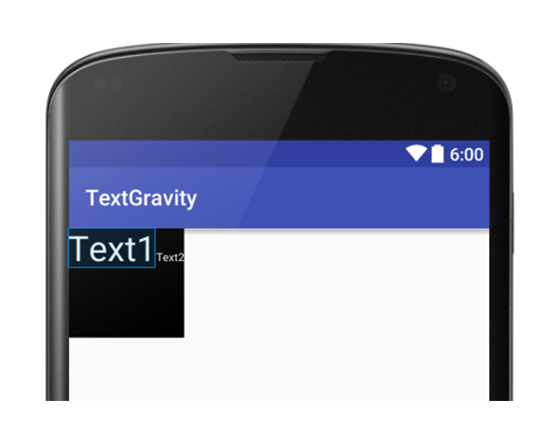
- Gravity is used to position the content of View(Textview) and layout_gravity is used to position the TextView based on its parent(LinearLayout)
If we are going to apply gravity like the following example:
android:layout_width="wrap_content"android:layout_height="100dp"android:orientation="horizontal"android:background="@color/black">
<TextViewandroid:layout_width="wrap_content"android:layout_height="wrap_content"android:text="Text1"android:textColor="@color/white"android:textSize="32sp"/><TextViewandroid:layout_width="wrap_content"android:layout_height="wrap_content"android:textColor="@color/white"android:text="Text2"android:textSize="10sp"/>
We will have the same output, Text1 and Text2 will not be centered vertically since the gravity is applied to views that have a height defined as “wrap_content”.
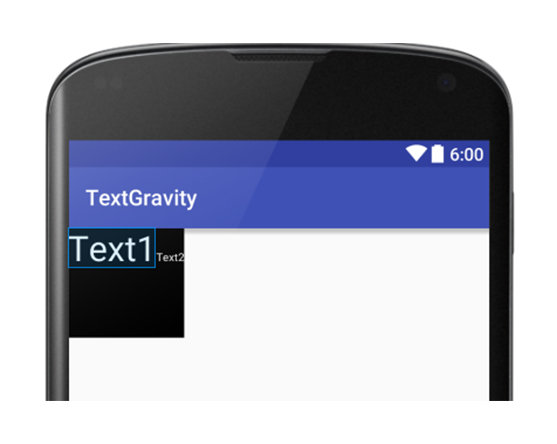
To center the TextViews, we need to use the “layout_gravity” attribute. Layout_gravity is used to set the alignment of TextViews with its parent(LinearLayout). See the following codes:
android:layout_width="wrap_content"android:layout_height="100dp"android:orientation="horizontal"android:background="@color/black"> <TextViewandroid:layout_width="wrap_content"android:layout_height="wrap_content"android:text="Text1"android:textColor="@color/white"android:textSize="32sp"android:gravity="center"/> <TextViewandroid:layout_width="wrap_content"android:layout_height="wrap_content"android:textColor="@color/white"android:text="Text2"android:textSize="10sp"android:gravity="center"/>
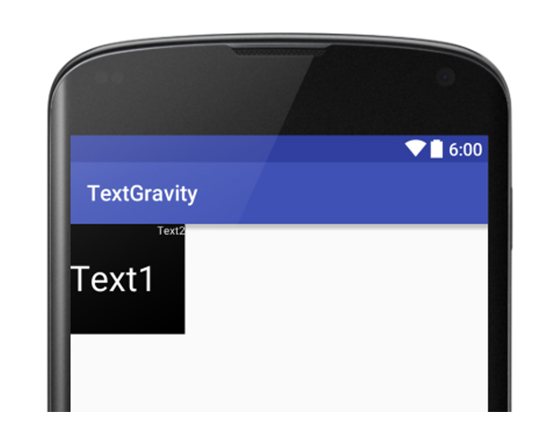
Now the next question is “Can we use gravity to center the content?”. The answer is Yes and we can achieve the same output as above. To do this, let us again carefully examine the codes below. Notice the value of layout_height of the two TextViews. It is set to “ wrap_content” and this is the reason why the content of Text2 is not shown at the center.
android:layout_width="wrap_content"android:layout_height="100dp"android:orientation="horizontal"android:background="@color/black"> <TextViewandroid:layout_width="wrap_content"android:layout_height="wrap_content"android:text="Text1"android:textColor="@color/white"android:textSize="32sp"/> <TextViewandroid:layout_width="wrap_content"android:layout_height="wrap_content"android:textColor="@color/white"android:text="Text2"android:textSize="10sp"/>
Setting the layout_height value to “match_parent” will do the trick. And our code will look like:
<TextViewandroid:layout_width="wrap_content"android:layout_height="wrap_content"android:text="Text1"android:textColor="@color/white"android:textSize="32sp"android:layout_gravity="center" /> <TextViewandroid:layout_width="wrap_content"android:layout_height="match_parent"android:textColor="@color/white"android:text="Text2"android:textSize="10sp"android:gravity="center"/>
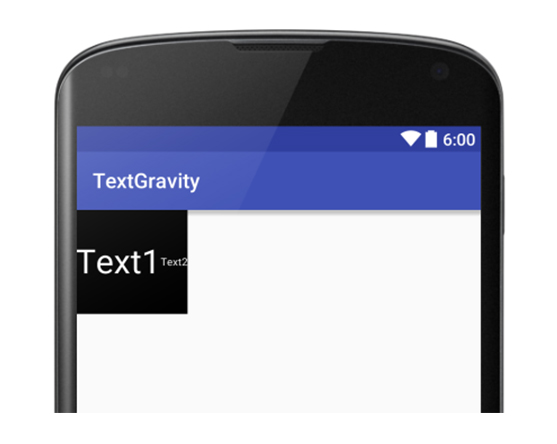
Now we can see that both gravity and layout_gravity can be used to align and positon views.
Hope this will help you better understand TextViews gravity.
Happy Android programming!

Ace Mark Urma
Ace Mark Urma
Ace has built up amazing skills as a backend developer and IT programmer over a decade of high-level experience and study. He has worked with SEIRIM for nearly 8 years, building a wide array of complex and high performance web applications and projects.
Ready to Get Secure?
The SEIRIM team of professionals is at your service to design, develop and deliver better cybersecurity for your organization.
let’s connect